Manage pharmaceutical product expiration.

MediScan scans, tracks, and flags near-expiry medicine in real time.

Pharmacy management dashboard
The problem

Every date still gets checked by hand

Manual checking icon

Products are still checked manually

Every item has to be checked and recorded by hand. This takes time, becomes tiring, and gets harder to manage as inventory grows.

Different labels icon

Older stock can easily be overlooked

Staff may pick the most accessible items instead of those expiring sooner. As a result, older stock can remain at the back and expire before it gets sold.

POS issue icon

Most systems don't track expiry

POS systems are designed to track sales, not expiration dates. Monitoring expired products and removing them from shelves still depends heavily on staff.

How it works

One app, two ways to use it

Scan products and manage inventory with your phone, or manage everything in a browser.

1

Scan a product

Point your camera at the label to capture the expiry date and product details.

2

Review and confirm

Check the scanned details, then save to your inventory.

3

Get notified on the spot

Receive alerts when items are approaching their expiry date.
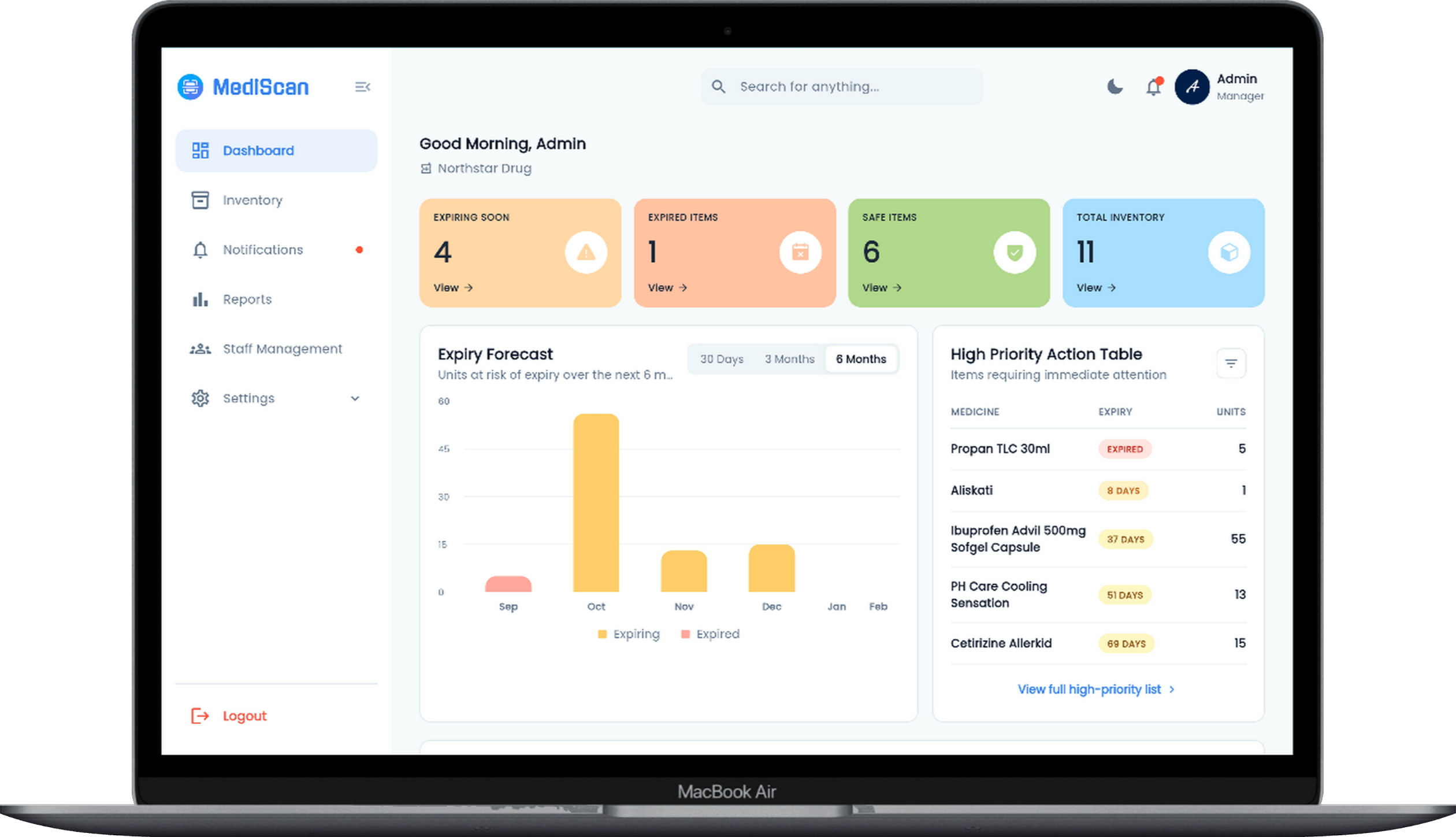
app.mediscan.space/dashboard
Web dashboard
1

Log in to your dashboard

Access your pharmacy's full inventory from any browser.

2

Check what's expiring

View items sorted by urgency, plus a 6-month forecast.

2

Manage staff

Add or invite staff, and control who can view or edit inventory.

3

Export your reports

Download a CSV or PDF report for restocking or audits.

Benefits

Faster than checking by hand

Scanning each product takes seconds, much quicker than reading labels and writing dates down one by one.

Flexible by design

Scan and manage from your phone, or handle everything from a browser.

Keeps inventory in trusted hands

Role-based staff access means only authorized people can view or edit records.

FAQ

Questions & Answers

Everything you need to know about scanning, inventory, and reports.

How does expiry scanning work?
Point your camera at the front of the product first, then flip it to the back/expiry label. MediScan is an AI-powered system that extracts the product name and expiry date automatically.
Why is my scan result inaccurate?
Blurry photos, glare, or partially covered text can affect the accuracy. Try rescanning in good lighting and holding the camera steady.
Can I edit the expiry date after scanning?
Yes. From the Inventory page, mobile users can swipe a product to the right and tap edit. On web, click the edit icon under the Actions column to update the product details.
How do I add or remove staff accounts?
Admin accounts can manage staff under Settings → Staff Management. Only admins can add or remove staff members.
How do I generate an inventory report?
From the Inventory screen, tap the report icon to open Generate Report. Choose a report type, export format , and reporting period.

Track expiry the easy way

See how MediScan fits into your pharmacy's daily routine.